Wednesday, 30 March 2016

Anime Phone Wallpapers

Made a couple of these mobile wallpapers a while ago. I keep misplacing them so I'm going to post them here.

They are all 1080x1920 and the bars are consistently placed.
I recommend using a background switcher like SB Wallpaper Changer to change the backgrounds over time.


Note: Artwork is not my own. I merely added the bars on the right for icon placement on my phone.

I'll do requests if your image is 1080x1920 and I like it :3

Wednesday, 11 November 2015

Osu!

I've been playing this rhythm game called Osu! a lot recently.
You should try it out!

This game is so fun! :3


Watch live video from MilkyTaste on Twitch

Monday, 20 July 2015

Opening new tabs with Dojo, Ajax and Safari on iPad

Recently found out that Safari won't call window.open() in a callback when using dojo.xhrPost and dojo.xhrGet. This is a false positive with the popup blocker. The pop up blocker is usually a good thing, so we don't want to just tell the user to disable it. We need another way to get around this.

Spent a good amount of time finding the answer to this, so figured I'd re-post it in case someone else has the same troubles.

For reference, I needed to do this as the page I wanted to open wouldn't be available until after a server hit was processed. Here's what I had.

dojo.xhrGet({
    url: some/url.html,
    load: function(){
        window.open('some/other/url.html');
    }
}); 

Without boring you with the details, the solution was to move the window.open() call out of the callback and then hold the window reference in a variation so that the window location could be updated after the server hit.

var winRef = window.open(); 
dojo.xhrGet({ 
    url: some/url.html,
    load: function(){
        winRef.location = 'some/other/url.html';
    }
});

Big thanks to Jens Arps for the solution to this issue.

Monday, 29 June 2015

Trouble Installing Docker Compose

Had some trouble installing Docker Compose on a fresh Fedora 22 install today.
Figured I'd write it here, as this is the kind of problem I'd hit multiple times...

Needed to run the following:

sudo dnf install python-devel
fixed the "missing Python.h" error, so that I could run:

sudo pip install -U websocket
fixed the "No module named urllib.parse" error, so that I could run:

sudo pip install -U docker-compose

And then it all worked fine :)

Wednesday, 11 February 2015

AWS Learnings

This post is for me not you ☺

I've started looking at Amazon Web Services as a cheap and easy way to host my various projects. Yes valued reader, that is another reason for this blog to die!
Since my memory is horrible I'm going to make a couple posts about the "problems" I faced. And by problems I mean things that weren't immediately obvious.


Creating a server


So you want to create a server? That's pretty vague. Let's attach some context.
> PHP, Linux, potential for autoscaled instances, auto load balancing, MySQL, simple code upload process.
Great! Let's use AWS Elastic Beanstalk!


  1. Click the 'Create New Application' link in the top right.
  2. Enter all the details, paying attention to: 
  3. Click Go
  4. Wait
Things of note. 
  • You don't have to choose an auto-scaled application right off the bat. You can select a single instance and change it later. This is great for testing that things actually work. 
  • You can add multiple environments later. If you want to separate dev, test and prod, you can do that. 
  • It gives you a readable URL. That's nice. 


How do I create my Application Source


A .war file for Java or a .zip for other supported languages. Pretty simple. 


Uploading a new Version


  1. Click on the environment you want to upload the new application version to. 
  2. Click "Upload and Deploy"
  3. Upload your version and give it a name
  4. Click Deploy
  5. Wait


Connecting to your RDS through PHP in your EC2


Now that you have an RDS and your PHP in an EC2 (or a couple of them), you are going to need to find a way to connect to the RDS. 


Setting environment variables


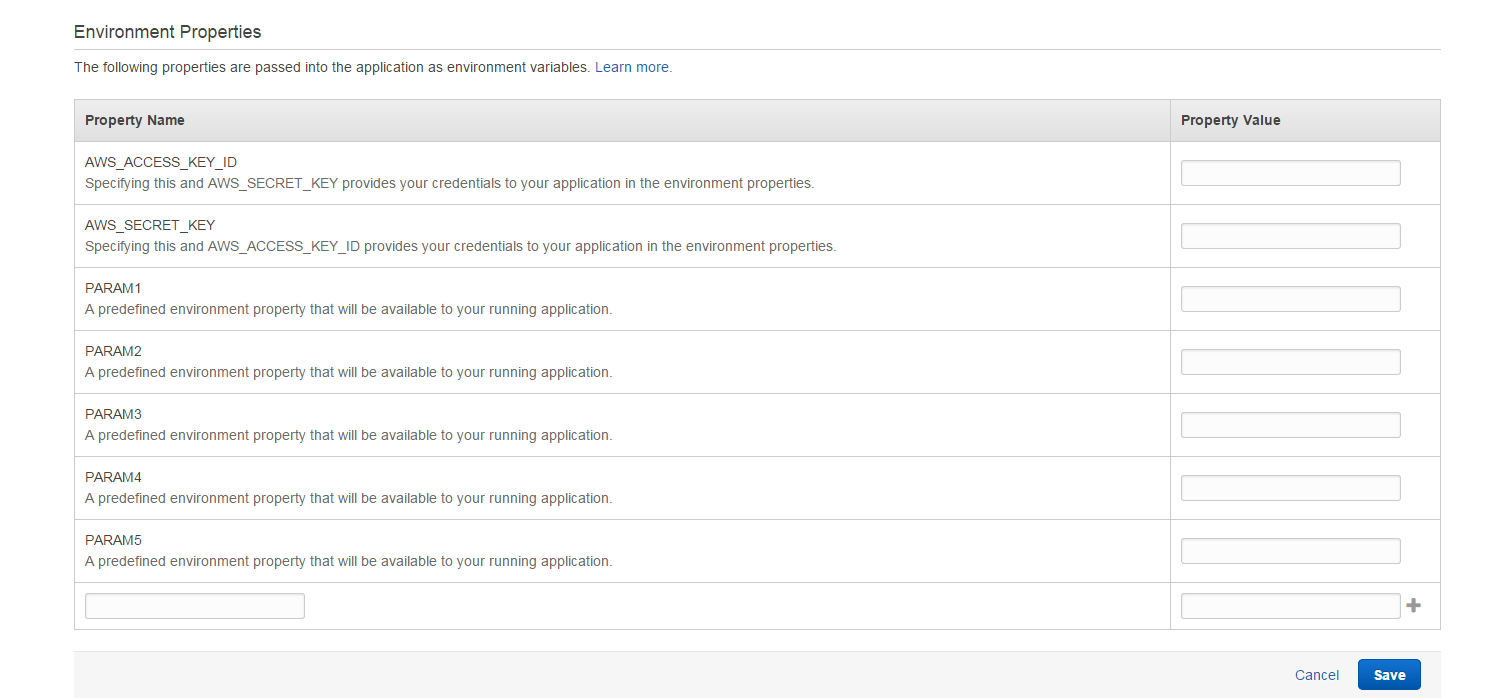
Now that you can connect to your RDS you are probably going to want to store your database access credentials as environment variables. Here's how you do that:
  1. Select the Environment for which you would like to add the variables
  2. Select Configuration from the left hand panel
  3. Click the gear icon on the Software Configuration box
  4. Scroll to the bottom of the page


I'm sure there will be more stuff but this will do as a quick post for now. 

Tuesday, 21 October 2014

Security Status Calculator - EVE

This post is a tool for EVE Online.

The calculations are well known but no one seems to have written a simple calculator for working out your new security status if you kill a dude.

So here you go:


Want to play for free? Here is a 21 day trial :3

Wednesday, 3 September 2014

Apache Server Permission Error

Every single time I create a new apache server I forget to give permissions to the www-data group. So I'm pasting a great answer I got from stackoverflow to this blog for future reference.

//Create new group
$ sudo addgroup webdev

//Change the group of your web directory:
$ sudo chgrp -R webdev /var/www/
$ sudo chmod -R g+rw /var/www/

//Set the guid bit on all folders in your web directory:
$ sudo find /var/www -type d -exec chmod +s {} \;

//Add Apache to the webdev group:
$ sudo usermod -a -G webdev www-data

//Add your user to the webdev group:
$ sudo usermod -a -G webdev <user_name>

Hopefully this helps someone