Monday, 13 February 2017

AWS Exams - Things to Remember

The primary audience for this post is myself.

I'm taking a number of AWS Certification exams and there are particular areas that I struggle to recall. Here is a list of them SO FAR. This should in no means be considered a complete list.

  • Know which services have native encryption at rest within the region, and which do not. For example, Storage Gateway and Glacier do, but DynamoDB, CF, and SQS do not. 
  • Have a good understanding of how Route53 supports all of the different DNS record types, and when you would use certain ones over others.
  • Know the difference between Directory Service's AD Connector and Simple AD. "Use Simple AD if you need an inexpensive Active Directory–compatible service with the common directory features. AD Connector lets you simply connect your existing on-premises Active Directory to AWS."
  • Elastic IPs are free if you have only one EIP per instance and the associated instance is running.
  • Know what four high level categories of information Trusted Advisor supplies: Cost Optimization, Performance, Security, and Fault Tolerance
    •  https://aws.amazon.com/premiumsupport/trustedadvisor/
  • Know about disaster recovery and the difference between RTO and RPO. 
    • https://d0.awsstatic.com/whitepapers/aws-disaster-recovery.pdf
  • Any CIDR block has 5 reserved IP addresses for AWS. (The first 4 and the last 1)
  • Don’t touch Main route table Create another routetable for route out to internet (0.0.0.0/0 IGW). Last thing you associate this new route table to one of the subnet which will make it public. 
  • Read data storage whitepaper
    •  https://d0.awsstatic.com/whitepapers/AWS%20Storage%20Services%20Whitepaper-v9.pdf
  • Raid 0(no redundancy / fault tolerance, high speed - low cost) - high I/O performance, Raid 1 - mirror two volumes together (disaster recovery, redundant , no performance improvement, writes latency increase) , Raid 5(R/W operation will continue, more popular, combination of performance, fault tolerance)

Tuesday, 7 June 2016

Creating a Web Drive on AWS

I don't trust cloud storage services, and you should either. So here is a guide to create your own online drive.

I should note, there are a couple services out there like ownCloud and soon to be NextCloud which will likely fulfill your cloud storage needs, but I found them to be cumbersome for my small use case. Plus doing it myself was a great way to learn some new things.

I choose AWS as a hosting solution because I already use them for my website and other random projects.

1. Create an EC2 Instance

In the AWS console, navigate to EC2 then click Launch Instance.

Note: Make sure you have selected the region you want the instance to be created in.

Select an Ubuntu Server AMI instance.
Select an Instance Type. I'm choosing t2.micro because it should fit my needs. This size is also in the free tier for those that are new to AWS.
Click Next
Click Next
Add some tags to your instance for identification. e.g. Name=CloudDrive
Configure Security Group. Add HTTP to your security group.
Launch the instance and generate a new key pair. It is always good practice to generate a new keypair for each instance.
Write down the created instances public IP address for future reference.

2. (Optional) Update your DNS Records

This will allow a friendly name for your site. e.g. webdrive.standen.link

In Route 53, or your favourite domain registrar, add a CNAME with a value of the public DNS of the instance you just created.

3. Install Apache with SSL

SSH into your instance, using the public IP address obtained earlier.

3.1 SSH using PuTTY on Windows (Skip this step if you are not using PuTTY on Windows)

Access PuTTY Key Generator and load your keypair downloaded earlier. (xxx.pem)
Click Save private Key to store a xxx.pek file that is accessible for PuTTY
When accessing your instance via PuTTY you will need to add this file under Connection > SSH > Auth in the "private key file for authentication" box.

3. Cont. 

Login as user ubuntu

Obtain root permissions
sudo -s

Update apt-get cache
apt-get update

Install Apache with SSL
apt-get install apache2 libapache2-mod-auth-mysql apache2-utils

4. Get a Certificate for SSL

There are a couple options for this. Each is outlined or linked below. I recommend option 3.

4.1 Generate and Self Sign your own Certificate. 

Browsers will not trust your certificate by default.
This will still enable secure communication.

Execute the following commands and fill in information as requested.

sudo openssl genrsa -des3 -out server.key 1024
sudo openssl req -new -key server.key -out server.csr
sudo openssl x509 -req -days 365 -in server.csr -signkey server.key -out server.crt

Copy the certificate into the correct folder
cp server.crt /etc/ssl/certs
cp server.key /etc/ssl/private

4.2 Use your a Certificate provided by your Favourite Certificate Authority

Costs money. Why would you pay for something that is (and should be) free? Look below.

4.3 Use Lets Encrypt

Install git on your instance
apt-get install git

Clone the certbot repository
git clone https://github.com/certbot/certbot

Update certbot and install your certificate
cd certbot
./certbot-auto --apache

During this you will have to supply the URL you will be accessing your instance from. This will either be your instance public IP address, or the address you specified in optional step 2.

Provide a valid email address! Just in case something goes wrong.

Agree to the terms and conditions, select Secure connection only.

4. Cont. 

Confirm your SSL configuration is adequate at https://www.ssllabs.com/ssltest/analyze.html?d=<your_website_here>

5. Set up WebDav

a2enmod dav
a2enmod dav_fs

Create a directory to share, and apply the appropritate permissions
mkdir /home/ubuntu/share
chown www-data:ubuntu /home/ubuntu/share

Set up a password
a2enmod auth_digest
mkdir /etc/password

Create a password for each user
htdigest -c /etc/password/digest-password CloudShare user1

Note: Additional users do not use the -c flag, as this overwrites the file.

Apply appropriate permissions to the password file
chown www-data:ubuntu /etc/password/digest-password

Edit the default-ssl config file (your config file may be default-ssl.conf)
nano /etc/apache2/sites-enabled/000-le-default-ssl.conf


Find the line CustomLog /var/log/apache2/ssl_access.log combined and under that place the following:

Alias /share /home/ubuntu/share

<Directory /home/ubuntu/share/>
  Options Indexes MultiViews
  AllowOverride None
  Order allow,deny
  allow from all
</Directory>

<Location /share>
  DAV On
  AuthType Digest
  AuthName "CloudShare"
  AuthUserFile /etc/password/digest-password
  Require valid-user
</Location>


Now restart Apache
/etc/init.d/apache2 restart


That's it!!

Well, kind of.

For information on how to map your cloud drive to your instance, check here http://www.webdavsystem.com/server/access/

You can also remove the default apache configuration for a cleaner look. You might also want to replace the instance storage with S3 or EBS storage.
I'm investigating the latter and will hopefully provide an update here when that's done.

Let me know if you have any problems in the comments below.

Wednesday, 30 March 2016

Anime Phone Wallpapers

Made a couple of these mobile wallpapers a while ago. I keep misplacing them so I'm going to post them here.

They are all 1080x1920 and the bars are consistently placed.
I recommend using a background switcher like SB Wallpaper Changer to change the backgrounds over time.


Note: Artwork is not my own. I merely added the bars on the right for icon placement on my phone.

I'll do requests if your image is 1080x1920 and I like it :3

Wednesday, 11 November 2015

Monday, 20 July 2015

Opening new tabs with Dojo, Ajax and Safari on iPad

Recently found out that Safari won't call window.open() in a callback when using dojo.xhrPost and dojo.xhrGet. This is a false positive with the popup blocker. The pop up blocker is usually a good thing, so we don't want to just tell the user to disable it. We need another way to get around this.

Spent a good amount of time finding the answer to this, so figured I'd re-post it in case someone else has the same troubles.

For reference, I needed to do this as the page I wanted to open wouldn't be available until after a server hit was processed. Here's what I had.

dojo.xhrGet({
    url: some/url.html,
    load: function(){
        window.open('some/other/url.html');
    }
}); 

Without boring you with the details, the solution was to move the window.open() call out of the callback and then hold the window reference in a variation so that the window location could be updated after the server hit.

var winRef = window.open(); 
dojo.xhrGet({ 
    url: some/url.html,
    load: function(){
        winRef.location = 'some/other/url.html';
    }
});

Big thanks to Jens Arps for the solution to this issue.

Monday, 29 June 2015

Trouble Installing Docker Compose

Had some trouble installing Docker Compose on a fresh Fedora 22 install today.
Figured I'd write it here, as this is the kind of problem I'd hit multiple times...

Needed to run the following:

sudo dnf install python-devel
fixed the "missing Python.h" error, so that I could run:

sudo pip install -U websocket
fixed the "No module named urllib.parse" error, so that I could run:

sudo pip install -U docker-compose

And then it all worked fine :)

Wednesday, 11 February 2015

AWS Learnings

This post is for me not you ☺

I've started looking at Amazon Web Services as a cheap and easy way to host my various projects. Yes valued reader, that is another reason for this blog to die!
Since my memory is horrible I'm going to make a couple posts about the "problems" I faced. And by problems I mean things that weren't immediately obvious.


Creating a server


So you want to create a server? That's pretty vague. Let's attach some context.
> PHP, Linux, potential for autoscaled instances, auto load balancing, MySQL, simple code upload process.
Great! Let's use AWS Elastic Beanstalk!


  1. Click the 'Create New Application' link in the top right.
  2. Enter all the details, paying attention to: 
  3. Click Go
  4. Wait
Things of note. 
  • You don't have to choose an auto-scaled application right off the bat. You can select a single instance and change it later. This is great for testing that things actually work. 
  • You can add multiple environments later. If you want to separate dev, test and prod, you can do that. 
  • It gives you a readable URL. That's nice. 


How do I create my Application Source


A .war file for Java or a .zip for other supported languages. Pretty simple. 


Uploading a new Version


  1. Click on the environment you want to upload the new application version to. 
  2. Click "Upload and Deploy"
  3. Upload your version and give it a name
  4. Click Deploy
  5. Wait


Connecting to your RDS through PHP in your EC2


Now that you have an RDS and your PHP in an EC2 (or a couple of them), you are going to need to find a way to connect to the RDS. 


Setting environment variables


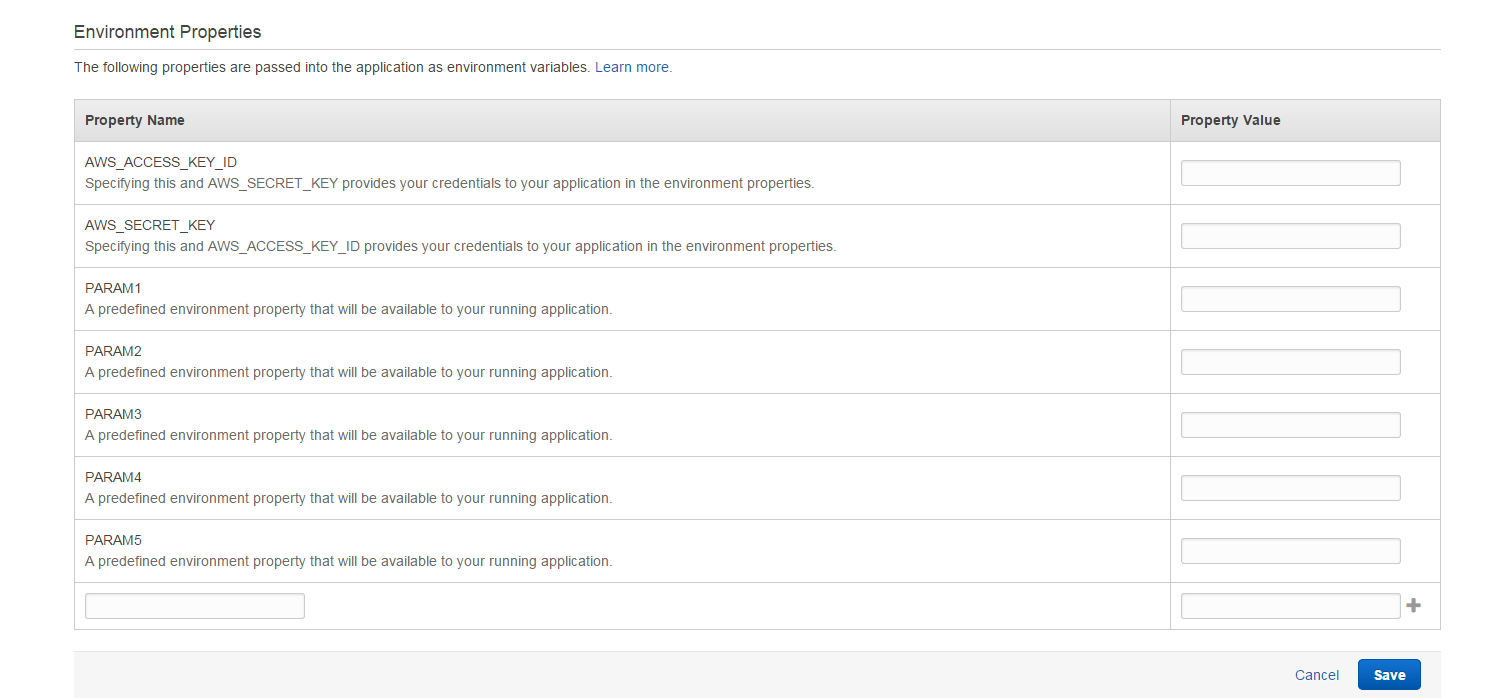
Now that you can connect to your RDS you are probably going to want to store your database access credentials as environment variables. Here's how you do that:
  1. Select the Environment for which you would like to add the variables
  2. Select Configuration from the left hand panel
  3. Click the gear icon on the Software Configuration box
  4. Scroll to the bottom of the page


I'm sure there will be more stuff but this will do as a quick post for now. 

Tuesday, 21 October 2014

Security Status Calculator - EVE

This post is a tool for EVE Online.

The calculations are well known but no one seems to have written a simple calculator for working out your new security status if you kill a dude.

So here you go:


Want to play for free? Here is a 21 day trial :3

Wednesday, 3 September 2014

Apache Server Permission Error

Every single time I create a new apache server I forget to give permissions to the www-data group. So I'm pasting a great answer I got from stackoverflow to this blog for future reference.

//Create new group
$ sudo addgroup webdev

//Change the group of your web directory:
$ sudo chgrp -R webdev /var/www/
$ sudo chmod -R g+rw /var/www/

//Set the guid bit on all folders in your web directory:
$ sudo find /var/www -type d -exec chmod +s {} \;

//Add Apache to the webdev group:
$ sudo usermod -a -G webdev www-data

//Add your user to the webdev group:
$ sudo usermod -a -G webdev <user_name>

Hopefully this helps someone

Monday, 13 January 2014

CreepTD Tower Defense

You require Java to play this game.

Play CreepTD - Online Multiplayer Tower Defense

Tower defense games are pretty cool. But something that's always been absent from them is multiplayer. This game has it. Give it a go. Pretty self explanatory if you know about Tower Defense games.

Saturday, 9 November 2013

Linux ATI Underscan Issue

I've recently installed Debian onto my PC and ran into the same problem I had with Ubuntu, and had to spend a long while finding the fix to it. I actually also had this problem with the same drivers on Windows 7 but the Catalyst Control Center GUI makes finding the answer a lot easier.

Here's the problem:

Images of problems thanks to am7146 of ubuntuforums [source]

The problem was due to the default setting of the ATI drivers setting the underscan to 20%. Why they would do this, I have no idea.

The solution is (as you'd expect) to change some of the settings! But which settings? Not the ones on the thread with the problem images!

I found the answer on askubuntu, here.

aticonfig --set-pcs-val=MCIL,DigitalHDTVDefaultUnderscan,0

Now if I ever decide to reinstall Linux on this box again I have the solution handy.

Monday, 28 May 2012

Exception Help

Keep find myself searching which exceptions to throw when, in regards to 'this code should never be reached' exceptions. Found a great post by Kevin Bourrillion, a software engineer at Google, which can be found here. Which I've copied below.
"
I've noticed a lot of confusion about what type of unchecked exception is the right one to throw under various circumstances. Here's a very simple explanation of the most common types.

NullPointerException
Multiple schools of thought on this one. Of course, it's thrown automatically by the runtime when you try to dereference null. Many say that you should never rely on this behavior, and should always check for null explicitly. Many also believe that when you find a null reference, you should throw IllegalArgumentException instead of NPE. This way, a thrown NPE always indicates some programming error in the implementation of the method, not a failure of the caller to pass valid parameters. I'm not taking a stand on this issue right now.

IllegalArgumentException
Throwing this exception implies that there exists at least one other value for this parameter that would have caused the check in question to pass. If the caller can't remedy this exception by substituting another value for the argument in question, it's the wrong exception to throw. Note that in some of these cases IndexOutOfBoundsException is more appropriate (and strangely, IOOBE doesn't extend IAE).

IllegalStateException
This exception implies that there are no argument values that could have caused the check to succeed, yet, there does exist at least one alternate state that the instance in question could have been in, which would have passed the check. Note that this type almost never makes sense for a static method, unless you rely heavily on static state (shame on you). Note also that this exception is appropriate whether or not it is possible to actually mutate this aspect of the instance's state, or it's already too late.

UnsupportedOperationException
This means that the method invoked will always fail for an instance of this class (concrete type), regardless of how the instance was constructed.

AssertionError
This is the right exception to use whenever a statement should by rights be impossible to reach.
"

Cheers,
Michael

Monday, 20 February 2012

By The End of 2012, I Will [Continued]

An update on this, as we are almost 2 months in.

1. Books read: 
The Stand, by Stephen King.
A Brief History of Time, by Stephen Hawking.

Currently reading:
Cell, by Stephen King

I'm not counting these but I'm also reading / have read a bunch of MLP fan fiction.
My Little Dashie, by ROBCakeran53.

Heonnshy, by Fenix.
And a bunch other short one chapter stories not worth mentioning.

2. Marathon Training:
Got a stationary bike and riding that on occasion. Making progress and that's the main thing.

4. Flip:
Not much done here. Doing handstands and stuff. Surely my overall fitness increase is helping this too.

5. Android Game:
Another game. This one based on Raiden.
Also have a working prototype. Doing this one straight to Android instead of coding to PC and then porting, like I tried with the last one. Once I get the prototype working, I'll post it up here.

6. Foods:
Had some Takoyaki a couple weeks ago. Pretty damn good so had some more this week again. That will do it for me, but I'm going to keep eating odd stuff where I can.

3. 7. 8. 9. 10. The rest:
Yeah, nothing. Some of these are one off things that I don't really need to prepare for, and will just happen when they happen.

On a funny note, this guy:

Cheers,
Milk

Tuesday, 24 January 2012

By The End of 2012, I Will

Walking down the road and I saw these on the bus stops. Pretty awesome really.


And so, here is my list.

By The End of 2012, I Will:
1. Read 12 books. (I don't read enough)
2. Run a marathon.
3. Get my full drivers licence. (Seriously, that's long overdue)
4. Do a flip.
5. Release something on the Android market.
6. Try a food I've never tried before.
7. Walk along the train tracks. (I'd walk for weeks if I had the time)
8. Catch a bird with my bare hands.
9. Experience free fall from a great height.
10. Learn all the first generation Pokemon in order.

What are you going to do?

Cheers,
Milk


Friday, 20 January 2012

A message from TPB

With the take down of MegaUpload I thought I was due another post. Below is the latest press release from ThePirateBay. Link to original. And yes I will get round to a post of Tor because it is well worth knowing about.

INTERNETS, 18th of January 2012. PRESS RELEASE, FOR IMMEDIATE RELEASE.
Over a century ago Thomas Edison got the patent for a device which would "do for the eye what the phonograph does for the ear". He called it the Kinetoscope. He was not only amongst the first to record video, he was also the first person to own the copyright to a motion picture.
Because of Edisons patents for the motion pictures it was close to financially impossible to create motion pictures in the North american east coast. The movie studios therefor relocated to California, and founded what we today call Hollywood. The reason was mostly because there was no patent. There was also no copyright to speak of, so the studios could copy old stories and make movies out of them - like Fantasia, one of Disneys biggest hits ever.
So, the whole basis of this industry, that today is screaming about losing control over immaterial rights, is that they circumvented immaterial rights. They copied (or put in their terminology: "stole") other peoples creative works, without paying for it. They did it in order to make a huge profit. Today, they're all successful and most of the studios are on the Fortune 500 list of the richest companies in the world. Congratulations - it's all based on being able to re-use other peoples creative works. And today they hold the rights to what other people create. If you want to get something released, you have to abide to their rules. The ones they created after circumventing other peoples rules.
The reason they are always complainting about "pirates" today is simple. We've done what they did. We circumvented the rules they created and created our own. We crushed their monopoly by giving people something more efficient. We allow people to have direct communication between eachother, circumventing the profitable middle man, that in some cases take over 107% of the profits (yes, you pay to work for them). It's all based on the fact that we're competition. We've proven that their existance in their current form is no longer needed. We're just better than they are.
And the funny part is that our rules are very similar to the founding ideas of the USA. We fight for freedom of speech. We see all people as equal. We believe that the public, not the elite, should rule the nation. We believe that laws should be created to serve the public, not the rich corporations.
The Pirate Bay is truly an international community. The team is spread all over the globe - but we've stayed out of the USA. We have Swedish roots and a swedish friend said this: The word SOPA means "trash" in Swedish. The word PIPA means "a pipe" in Swedish. This is of course not a coincidence. They want to make the internet inte a one way pipe, with them at the top, shoving trash through the pipe down to the rest of us obedient consumers. The public opinion on this matter is clear. Ask anyone on the street and you'll learn that noone wants to be fed with trash. Why the US government want the american people to be fed with trash is beyond our imagination but we hope that you will stop them, before we all drown.
SOPA can't do anything to stop TPB. Worst case we'll change top level domain from our current .org to one of the hundreds of other names that we already also use. In countries where TPB is blocked, China and Saudi Arabia springs to mind, they block hundreds of our domain names. And did it work? Not really. To fix the "problem of piracy" one should go to the source of the problem. The entertainment industry say they're creating "culture" but what they really do is stuff like selling overpriced plushy dolls and making 11 year old girls become anorexic. Either from working in the factories that creates the dolls for basically no salary or by watching movies and tv shows that make them think that they're fat.
In the great Sid Meiers computer game Civilization you can build Wonders of the world. One of the most powerful ones is Hollywood. With that you control all culture and media in the world. Rupert Murdoch was happy with MySpace and had no problems with their own piracy until it failed. Now he's complainting that Google is the biggest source of piracy in the world - because he's jealous. He wants to retain his mind control over people and clearly you'd get a more honest view of things on Wikipedia and Google than on Fox News.
Some facts (years, dates) are probably wrong in this press release. The reason is that we can't access this information when Wikipedia is blacked out. Because of pressure from our failing competitors. We're sorry for that.
THE PIRATE BAY, (K)2012

Tuesday, 29 November 2011

Peer Blocker

Since the new laws in New Zealand regarding peer-to-peer have come into play, torrenting has become a little bit trickier. Basically, if a copyright holder thinks you have been using peer-to-peer to download and share content illegally, you can be charged. Gone are the ways of innocent until proven guilty. While the most effective way to prevent getting a fine is to not download illegal content, the phrase "You only have to run faster than the other guy" comes to mind. That being said PeerBlock is an effective way to remove yourself from the grid.


That's a wallpaper by the way. PeerBlock allows you to restrict which IP addresses your computer will communicate directly with. This is by no means a perfect system. Without the knowledge of which IP addresses to block it is pointless. PeerBlock comes with a decent set of default options that include government agencies and related companies, which will help a lot. Fortunately for anything missing iBlockList has a large list of well lists of IP addresses for various things. Definately worth checking that one out. But, if you want to be even more cautious, I have found a list of every large IP address block allocated to New Zealand. Beautiful isn't it. Copy the page into a file and rename it NZipRanges.p2p then add it to PeerBlock using the List Manager. Simple.

PeerBlock is not only a good thing for blocking peer-to-peer tracking, but also for blocking ads and spyware. So regardless of what you are planning on doing, you should get this.

DOWNLOAD LINK - not spam.

As a side note, you may find you cannot connect to some of your favourite websites or game servers. You can see which IP is being blocked by PeerBlock and then add it to the white list. Planning a future post about Tor to help further protect your anonymity.

Cheers,
Milk

Saturday, 19 November 2011

Getting around SOPA

Firstly, I am not going to go into a huge thing about the bill and what it does and why it's bad. But the end note is that it is bad. The real pirates are the ones who know how to get around these preventative measures anyway. It's only creating an even larger gap between those who have the skills and those that don't.


I've taken the liberaty to list a bunch of IP addresses of popular file sharing sites. If I have missed any, you can easily look them up yourselves before the law come into effect here. Simply type it into your browser and you're there.


The IP address of www.thepiratebay.org is 194.71.107.15


The IP address of www.mininova.org is 80.94.76.5


The IP address of www.isohunt.com is 208.95.173.130


The IP address of www.4chan.org is 199.27.135.129


The IP address of www.youtube.com is 209.85.148.93


The IP address of www.blogger.com is 74.125.39.191
(Oh teh noes, my blog!)


The IP address of www.facebook.com is 69.171.224.11


The IP address of www.flickr.com is 68.142.214.24


The IP address of www.vimeo.com is 74.113.233.128

Cheers,
Milk

Friday, 18 November 2011

IP Webcam - Android App

I had the idea of attaching my phone to our NXT robot so that we can see what it sees, as it didn't come with a camera. First thought was to write this myself, but since Android is awesome, someone has done it for me. 

Check it out here. My phone isn't the most powerful, but it runs with no problems at all. Even in the background. 

1) Click start on your phone.
2) Jump on your favourite web browser and type in the URI printed at the bottom of your phone screen.
3) ????
4) Profit!!!

Personally I found using VLC media player a far better option than using a web browser. Press Ctrl + N and enter the URL in here. e.g. http://172.24.120.167:8080/videofeed

And then BAM! Wireless spy camera. Just hope no one steals your phone.

Cheers,
Milk

Thursday, 17 November 2011

NXT Robots

So you know how I did a project on swarm robotics and I said I would have some video of it all working, well I forgot and deleted the codes. Rageragerage. The only thing I can find is a screen shot of some early development in my collision avoidance, shown below. The robots are the small boxes and the blue is the line of sight. Trails are on to show the movement path. The yellow one (only one moving) was going to hit the blue one so swerved violently to the right, where he saw he was about to hit the brown so swerved left, then corrected once seeing he had passed the blue robot.


Any who, I now have a summer research project working with Lego. That's right. My summer job is playing with Lego. Jelly? I thought so.


The Lego MindStorm NXT is a robot is a small computer that can support 4 input devices and 3 output devices. Included in our pack are 3 motors (outputs) and 2 touch sensors, 1 ultrasound sensor, and 1 colour sensor. The NXT also supports Bluetooth so I am considering making a controller using my Android. Woot! Here are some existing projects.

 Find and grab a ball
 Solve a Rubik's cube. Epic.
 Fire balls at target.
 Solve a Sudoku
Follow a path.

I am part of a group of 4 people looking at doing some project with these robots. We are looking to have 3 of them and have them interact in some way. The exact specifications of the project are really vague. But we are looking at a warehouse simulation with automated forklifts. Still undecided but this is sounding most likely. This is something that has been done before but not completely autonomous with multiple robots.

We are to program it in Java using LeJOS (Lego Java OS), which is fantastic because I love Java. But terrible because no one on my team has used it before. We will see how this goes.

Epic post about a great Android app coming out soon.

That's all for now.

Cheers,
Milk

Sunday, 30 October 2011

Cracking and Hacking

Just three simple things I found on lifehacker that I thought was worth a look at.

1) Picking locks.
2) Picking vehicle locks. Wish I knew this when I locked my cars in my car... Coat hanger through the door was a winner.
3) Free wifi. Good when you're on the go.